 |
YAC 3.7.1
Yet Another Coupler
|

This method supports source fields that are defined on cells.
For each source cell this method searches for the nearest target cell. If set, it will discard all target cells that are further away then the user provided maximum search distance. The source cell data is then distributed to all non-masked targets that are within the user provided spread distance around the initially found target cell. If multiple source cells contribute to a target cell, their contributions are summed up. Target cells not associated with any source cell will not get any value.
The user can choose between multiple options how the data from one source cell is distributed among the associated target cells.
There are also multiple scaling options available, which can scale the source and/or target field based on the cell areas of the associated source/target cells. In case river runoff is provided/expected by the components as a flux, this can be used to ensure conservation.
This method has been implemented in particular to cover the mapping of the hydrological discharge. This quantity is provided on selected cells at the coastline. In ICON, the discharge is assembled at coastal land cells and then stored on the nearest ocean cells on the donor grid. The goal of all other interpolation schemes is to generate an interpolation for target cells. In contrast to that, this method aims to be mass conserving and not to loose any water from the donor cells.
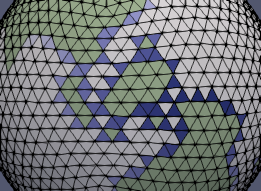
Remark: Here distances between two points on the surface of a unit sphere are defined as the angle between two vectors that point from the center of the sphere to the two points. In the configuration file, these distances have to be provided in degree.
Spread distance (default: spread_distance: 0.0)
Valid range: 0.0 <= spread_distance < 90.0
A distance of 0.0 results in the source field values being assigned to the single closest target point.
Maximum search distance (default: max_search_distance: 0.0)
Valid range: 0.0 <= max_search_distance < 180.0
A distance of 0.0 results in an unlimited search distance.
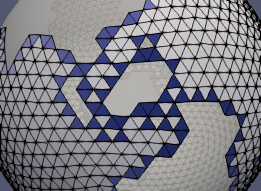
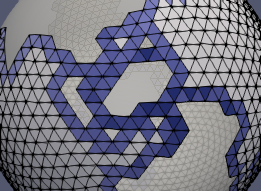
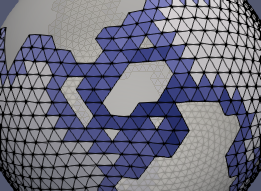
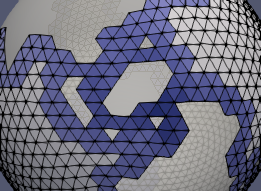
weighted: arithmetic_average)arithmetic_average
Simple average
| spread_distance = 0.0 | spread_distance = 0.5 | spread_distance = 1.0 | spread_distance = 2.0 |
|---|---|---|---|
| 
| 
| 
|
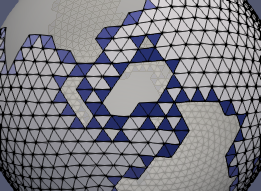
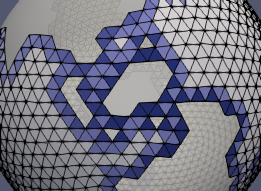
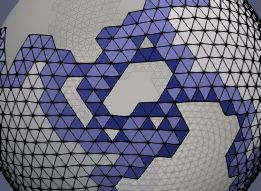
distance_weighted
Inverse distance weighted
| spread_distance = 0.0 | spread_distance = 0.5 | spread_distance = 1.0 | spread_distance = 2.0 |
|---|---|---|---|
| 
| 
| 
|
scale: none)none
No scaling
The sum of the weights for each source cell is 1.0.
This can be used in case the source and target field are not provided as a flux
(for example: source/target field unit = m^3/s).
srcarea
Source cell area
All weights are scaled by the area of the associated source cell. Therefore, weights for each source cell sum to its area.
This can be used in case the source field is provided as a flux while the target field is not
(for example: source field unit = m/s; target field unit = m^3/s).
invtgtarea
Inverse target area
All weights are scaled by the inverse area of the associated target cell.
This can be used in case the target field is provided as a flux while the source field is not
(for example: source field unit = m^3/s; target field unit = m/s).
fracarea
Fractional area
All weights are scaled by the area of the associated source cell and the inverse area of the associated target cell.
This can be used in case the source and target field is provided as a flux
(for example: source/target field unit = m/s).
src_cell_area:yac:sphere_radius: 1.0tgt_cell_area:yac:sphere_radius: 1.0) The user can explicitly specified whether the areas of the cell is computed by YAC or read from a user-provided netCDF file. The option, for which the user provides information for, is choosen. If no information is provided, the default option is used.Compute by YAC (yac; the default option)
The cell areas are computed by YAC based on the respective grid information.
Sphere radius (default: sphere_radius: 1.0)
Valid range: 0.0 < sphere_radius
Sphere radius used for the area computation of the cells.
Read from file (file)
Cell areas are read from netCDF file in parallel (see Configuration of parallel IO in YAC). The global cell ids are used to map the data from the file to the cells. The first element in the file has the address = 0. The addesses are determined by:
address = cell_global_id - min_global_id
Since the mapping is based on global cell ids, the user should provide the respective id, otherwise the results are undefined.
File name (filename; no default)
Name of the netCDF file containing the cell areas.
Variable name (varname; no default)
Name of the variable in the file that contains the cell areas.
Minimal global cell id (default: min_global_id: 0)
Minimal global cell id used to map id's to addresses.
 1.11.0